バージョン 4.6 からバージョン 4000 への移行例: SpatialMap_Sparse_Localizing sample の移行
この記事では、SpatialMap_Sparse_Localizing sample を EasyAR Sense Unity Plugin バージョン 4.6 からバージョン 4000 に移行する方法を説明します。
plugin パッケージを置き換える
plugin パッケージの置き換えについては、一般移行ガイド を参照してください。
scene を再構築する (必須)
scene から AR Session を削除します。
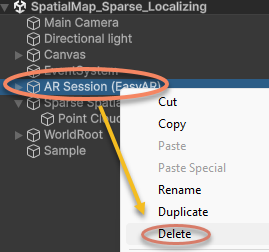
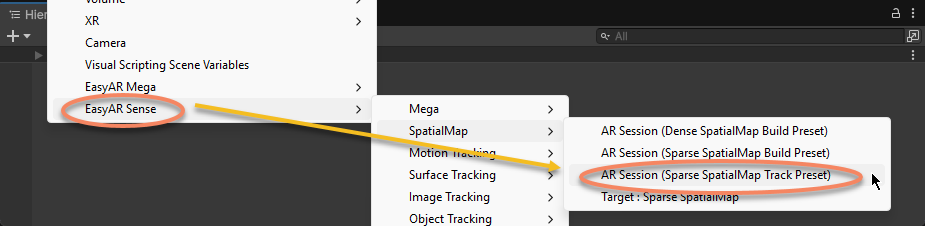
AR Session を再作成します。
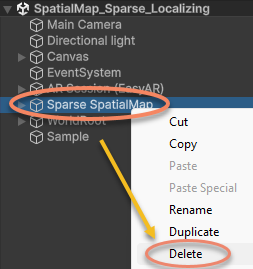
scene から Sparse SpatialMap を削除します。
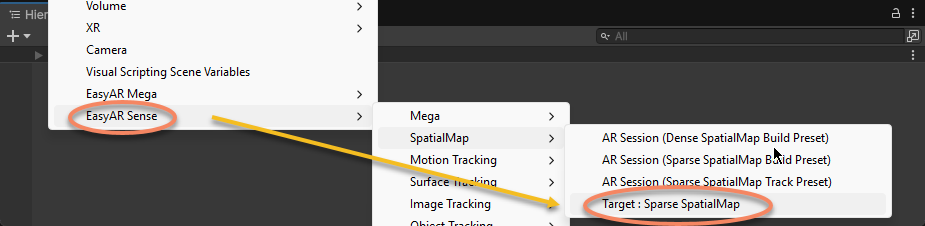
Sparse SpatialMap を再作成します。
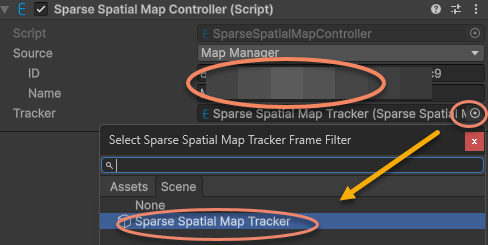
Sparse SpatialMap Controller コンポーネントの Inspector ウィンドウで、sparse spatial map の ID と Name を入力し、Tracker を指定します。
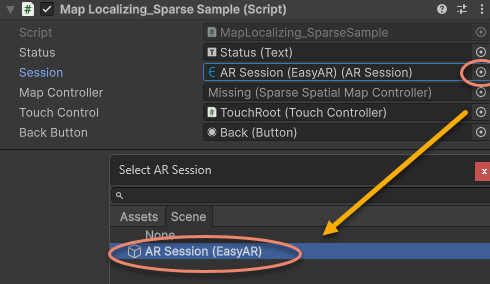
sample script 内の ARSession を、新しく作成した AR Session (EasyAR) に再指定します。
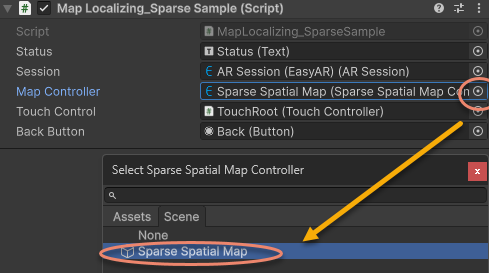
sample script 内の MapController を、新しく作成した Sparse SpatialMap Controller に再指定します。
互換性のないコードを変更する
Start 内で Status を出力するコードを削除し、新バージョン API に従って sparse spatial map の localization コールバックを MapController.TargetFound と MapController.TargetLost に更新します。
旧バージョンのコード:
sparse = Session.GetComponentInChildren<SparseSpatialMapWorkerFrameFilter>();

if (string.IsNullOrEmpty(MapController.MapManagerSource.ID) || string.IsNullOrEmpty(MapController.MapManagerSource.Name))
{
    throw new UIPopupException("Map ID or Name NOT set, please set MapManagerSource on: " + MapController + Environment.NewLine +
        "To create SpatialMap, use <SpatialMap_SparseSpatialMap> sample." + Environment.NewLine +
        "To get Map ID and Name, use EasyAR Develop Center (www.easyar.com) -> SpatialMap -> Database Details." + Environment.NewLine +
        "Map ID is used when loading, it can be used to share maps among devices.", 100);
}

MapController.MapLoad += (map, status, error) =>
{
    GUIPopup.EnqueueMessage("Load map {name = " + map.Name + ", id = " + map.ID + "} into " + sparse.name + Environment.NewLine +
        " => " + status + (string.IsNullOrEmpty(error) ? "" : " <" + error + ">"), status ? 3 : 5);

    if (!status)
    {
        return;
    }

    GUIPopup.EnqueueMessage("Notice: load map (only the first time each map) will trigger a download in this sample." + Environment.NewLine +
        "Statistical request count will be increased (more details on EasyAR website)." + Environment.NewLine +
        "Map cache is used after a successful download." + Environment.NewLine +
        "Map cache will be cleared if SparseSpatialMapManager.clear is called or app uninstalled.", 5);
};

MapController.MapLocalized += () =>
{
    GUIPopup.EnqueueMessage("Localized map {name = " + MapController.MapInfo.Name + "}", 3);
};

MapController.MapStopLocalize += () =>
{
    GUIPopup.EnqueueMessage("Stopped localize map {name = " + MapController.MapInfo.Name + "}", 3);
};

sparse.Localizer.startLocalization();
次のように変更:
sparse = Session.GetComponentInChildren<SparseSpatialMapWorkerFrameFilter>();

MapController.TargetFound += () =>
{
    Debug.Log($"Found target {{name = {MapController.Info.Name}}}");
};

MapController.TargetLost += () =>
{
    if (!MapController) { return; }
    Debug.Log($"Lost target {{name = {MapController.Info.Name}}}");
};
Update で新しい API を使用し、疎な空間マップが存在して直接トラッキングされているかを判定します:
元バージョンのコード:
private void Update()
{
    Status.text = $"Device Model: {SystemInfo.deviceModel} {deviceModel}" + Environment.NewLine +
        "VIO Device" + Environment.NewLine +
        "\tType: " + ((Session.Assembly != null && Session.Assembly.FrameSource) ? Session.Assembly.FrameSource.GetType().ToString().Replace("easyar.", "").Replace("FrameSource", "") : "-") + Environment.NewLine +
        "\tTracking Status: " + Session.TrackingStatus + Environment.NewLine +
        "Sparse Spatial Map" + Environment.NewLine +
        "\tWorking Mode: " + sparse.WorkingMode + Environment.NewLine +
        "\tLocalization Mode: " + sparse.LocalizerConfig.LocalizationMode + Environment.NewLine +
        "Localized Map" + Environment.NewLine +
        "\tName: " + (sparse.LocalizedMap == null ? "-" : (sparse.LocalizedMap.MapInfo == null ? "-" : sparse.LocalizedMap.MapInfo.Name)) + Environment.NewLine +
        "\tID: " + (sparse.LocalizedMap == null ? "-" : (sparse.LocalizedMap.MapInfo == null ? "-" : sparse.LocalizedMap.MapInfo.ID)) + Environment.NewLine +
        "\tPoint Cloud Count: " + (sparse.LocalizedMap == null ? "-" : sparse.LocalizedMap.PointCloud.Count.ToString()) + Environment.NewLine +
        "Cube Location: " + (onSparse ? "On Sparse Spatial Map" : (Session.TrackingStatus.OnSome && Session.TrackingStatus != MotionTrackingStatus.NotTracking ? "Air" : "-")) + Environment.NewLine +
        Environment.NewLine +
        "Gesture Instruction" + Environment.NewLine +
        "\tMove to Sparse Spatial Map Point: One Finger Move" + Environment.NewLine +
        "\tScale: Two Finger Pinch";

    if (Input.touchCount == 1 && !EventSystem.current.IsPointerOverGameObject(Input.GetTouch(0).fingerId))
    {
        var touch = Input.touches[0];
        if (touch.phase == TouchPhase.Moved)
        {
            var viewPoint = new Vector2(touch.position.x / Screen.width, touch.position.y / Screen.height);
            if (sparse && sparse.LocalizedMap)
            {
                var points = sparse.LocalizedMap.HitTest(viewPoint);
                foreach (var point in points)
                {
                    onSparse = true;
                    TouchControl.transform.position = sparse.LocalizedMap.transform.TransformPoint(point);
                    break;
                }
            }
        }
    }
}
次のように変更します:
private void Update()
{
    if (Input.touchCount == 1 && !EventSystem.current.IsPointerOverGameObject(Input.GetTouch(0).fingerId))
    {
        var touch = Input.touches[0];
        if (touch.phase == TouchPhase.Moved)
        {
            var viewPoint = new Vector2(touch.position.x / Screen.width, touch.position.y / Screen.height);
            if (MapController && MapController.IsDirectlyTracked)
            {
                var points = MapController.HitTest(viewPoint);
                foreach (var point in points)
                {
                    onSparse = true;
                    TouchControl.transform.position = MapController.transform.TransformPoint(point);
                    break;
                }
            }
        }
    }
}
これで sample scene と scripts はバージョン 4000.0 に更新され、実行できるようになります。