target 및 origin에 적용되는 active control 전략
다음 내용을 통해 target 및 origin 아래 객체의 기본 표시/숨김 전략과 필요에 따라 조정하는 방법을 이해할 수 있습니다.
시작하기 전에
- Target을 읽고 target의 기본 개념, 상태 및 lifecycle을 이해하십시오.
- XR Origin을 읽고 XR Origin의 기본 개념, 구성 및 lifecycle을 이해하십시오.
Active control 및 제어 전략 유형
session 실행 중 target과 origin은 tracking 및 lost 같은 상태 변화를 겪습니다. active control 전략을 통해 target 및 origin 아래 객체의 표시와 숨김 동작을 자동으로 관리할 수 있습니다.
Unity에서 ActiveController 컴포넌트는 target 및 orign 객체의 GameObject.activeSelf 상태를 자동으로 관리합니다. 이를 통해 target이 tracking되거나 motion tracking이 tracking을 시작한 뒤 콘텐츠를 표시하고, target이 lost되거나 motion tracking이 성공적으로 초기화되기 전에 콘텐츠를 숨깁니다.
ActiveController는 두 가지 active control 전략을 제공합니다.
- ActiveWhileTracked: tracking 중일 때 GameObject가 활성화됩니다(GameObject.activeSelf가
true로 설정). tracking이 lost되면 GameObject가 비활성화됩니다(GameObject.activeSelf가false로 설정). - ActiveAfterFirstTracked: 첫 tracking 이전에는 GameObject가 비활성화됩니다(GameObject.activeSelf가
false로 설정). 한 번 성공적으로 tracking되면 GameObject는 계속 활성화됩니다(GameObject.activeSelf가true로 설정).
기본적으로 TargetController는 ActiveWhileTracked 전략을 사용합니다. 이는 target이 tracking될 때 target과 그 아래 콘텐츠가 활성화되고, tracking이 lost되면 target과 그 콘텐츠가 비활성화됨을 의미합니다.
기본적으로 XROriginChildController는 ActiveAfterFirstTracked 전략을 사용합니다. 이는 motion tracking이 성공적으로 초기화되기 전에는 origin과 그 아래 콘텐츠가 비활성화되고, motion tracking이 성공적으로 초기화되면 origin과 그 아래 콘텐츠가 계속 활성화됨을 의미합니다.
다른 active control 전략 선택
Inspector 패널을 열고 Strategy 드롭다운 메뉴에서 Input을 선택합니다.
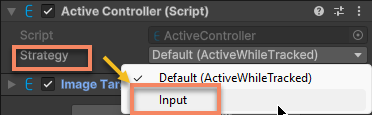
그런 다음 오른쪽에서 필요한 active control 전략을 선택하여 기본 전략을 덮어씁니다.
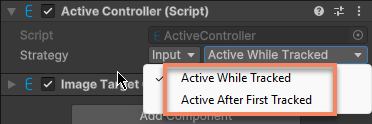
script에서는 OverrideStrategy 속성을 통해 기본 active control 전략을 덮어쓸 수 있습니다.
예를 들어 다음 코드는 target의 active control 전략을 ActiveAfterFirstTracked로 설정하는 방법을 보여줍니다.
target.ActiveController.OverrideStrategy = ActiveController.Strategy.ActiveAfterFirstTracked;
active 전략의 변경은 즉시 적용되며 현재 tracking 상태에 따라 GameObject.activeSelf가 업데이트됩니다.
Active control 끄기
필요에 따라 직접 제어하는 등 active control을 완전히 비활성화해야 하는 경우, ActiveController 컴포넌트를 비활성화하여 active control을 끌 수 있습니다.
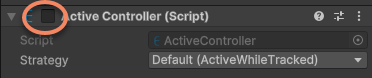
script에서는 ActiveController.enabled 속성을 설정하여 active control을 끌 수 있습니다.
target.ActiveController.enabled = false;
ActiveController.enabled 속성의 변경은 즉시 적용되며, GameObject.activeSelf는 더 이상 tracking 상태에 따라 업데이트되지 않습니다. ActiveController 컴포넌트를 다시 활성화하면 GameObject.activeSelf가 현재 tracking 상태에 따라 업데이트됩니다.