迁移版本 4.6 到版本 4000 实例:迁移 SpatialMap_Sparse_Localizing 示例
本文介绍如何将 SpatialMap_Sparse_Localizing 示例从 EasyAR Sense Unity Plugin 4.6 版本迁移到 4000 版本。
替换插件包
参考 通用迁移指南 替换插件包。
重新构建场景(必须)
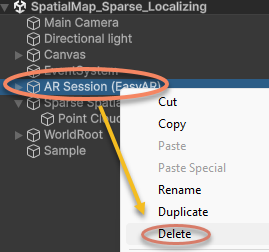
删除场景中的 AR Session:
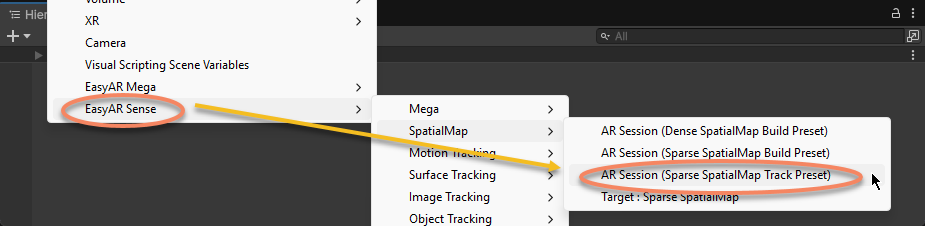
重新 AR Session:
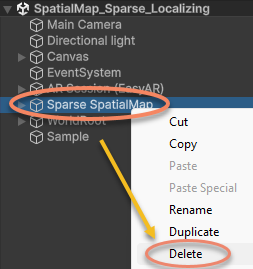
删除场景中的 Sparse SpatialMap:
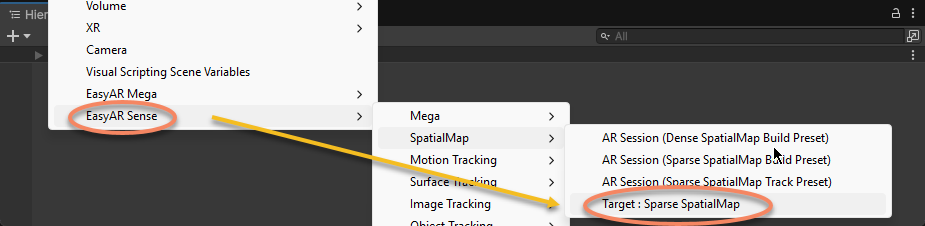
重新创建 Sparse SpatialMap:
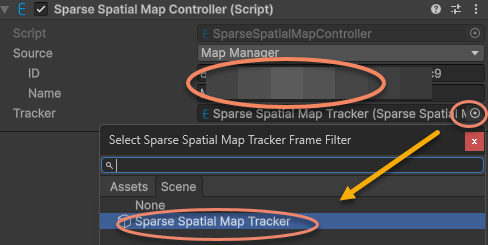
在 Sparse SpatialMap Controller 组件的 Inspector 窗口中,填入稀疏空间地图的 ID 和 Name,并指定 Tracker:
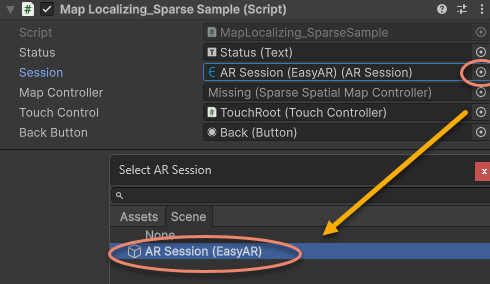
重新指定示例脚本中的 ARSession 为新创建的 AR Session (EasyAR):
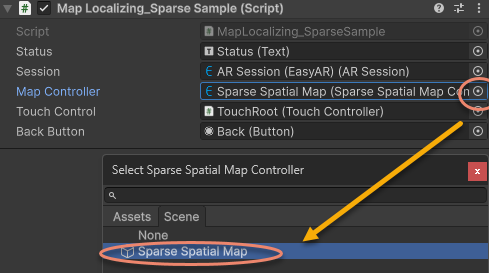
重新指定示例脚本中的 MapController 为新创建的 Sparse SpatialMap Controller:
修改不兼容代码
在 Start 中去掉打印 Status 的代码,根据新版本 API 将稀疏空间地图的定位回调更新为 MapController.TargetFound 和 MapController.TargetLost:
原版本代码:
sparse = Session.GetComponentInChildren<SparseSpatialMapWorkerFrameFilter>();

if (string.IsNullOrEmpty(MapController.MapManagerSource.ID) || string.IsNullOrEmpty(MapController.MapManagerSource.Name))
{
    throw new UIPopupException("Map ID or Name NOT set, please set MapManagerSource on: " + MapController + Environment.NewLine +
        "To create SpatialMap, use <SpatialMap_SparseSpatialMap> sample." + Environment.NewLine +
        "To get Map ID and Name, use EasyAR Develop Center (www.easyar.com) -> SpatialMap -> Database Details." + Environment.NewLine +
        "Map ID is used when loading, it can be used to share maps among devices.", 100);
}

MapController.MapLoad += (map, status, error) =>
{
    GUIPopup.EnqueueMessage("Load map {name = " + map.Name + ", id = " + map.ID + "} into " + sparse.name + Environment.NewLine +
        " => " + status + (string.IsNullOrEmpty(error) ? "" : " <" + error + ">"), status ? 3 : 5);

    if (!status)
    {
        return;
    }

    GUIPopup.EnqueueMessage("Notice: load map (only the first time each map) will trigger a download in this sample." + Environment.NewLine +
        "Statistical request count will be increased (more details on EasyAR website)." + Environment.NewLine +
        "Map cache is used after a successful download." + Environment.NewLine +
        "Map cache will be cleared if SparseSpatialMapManager.clear is called or app uninstalled.", 5);
};

MapController.MapLocalized += () =>
{
    GUIPopup.EnqueueMessage("Localized map {name = " + MapController.MapInfo.Name + "}", 3);
};

MapController.MapStopLocalize += () =>
{
    GUIPopup.EnqueueMessage("Stopped localize map {name = " + MapController.MapInfo.Name + "}", 3);
};

sparse.Localizer.startLocalization();
修改为:
sparse = Session.GetComponentInChildren<SparseSpatialMapWorkerFrameFilter>();

MapController.TargetFound += () =>
{
    Debug.Log($"Found target {{name = {MapController.Info.Name}}}");
};

MapController.TargetLost += () =>
{
    if (!MapController) { return; }
    Debug.Log($"Lost target {{name = {MapController.Info.Name}}}");
};
在 Update 中使用新的 API 判断稀疏空间地图是否存在且被直接跟踪:
原版本代码:
private void Update()
{
    Status.text = $"Device Model: {SystemInfo.deviceModel} {deviceModel}" + Environment.NewLine +
        "VIO Device" + Environment.NewLine +
        "\tType: " + ((Session.Assembly != null && Session.Assembly.FrameSource) ? Session.Assembly.FrameSource.GetType().ToString().Replace("easyar.", "").Replace("FrameSource", "") : "-") + Environment.NewLine +
        "\tTracking Status: " + Session.TrackingStatus + Environment.NewLine +
        "Sparse Spatial Map" + Environment.NewLine +
        "\tWorking Mode: " + sparse.WorkingMode + Environment.NewLine +
        "\tLocalization Mode: " + sparse.LocalizerConfig.LocalizationMode + Environment.NewLine +
        "Localized Map" + Environment.NewLine +
        "\tName: " + (sparse.LocalizedMap == null ? "-" : (sparse.LocalizedMap.MapInfo == null ? "-" : sparse.LocalizedMap.MapInfo.Name)) + Environment.NewLine +
        "\tID: " + (sparse.LocalizedMap == null ? "-" : (sparse.LocalizedMap.MapInfo == null ? "-" : sparse.LocalizedMap.MapInfo.ID)) + Environment.NewLine +
        "\tPoint Cloud Count: " + (sparse.LocalizedMap == null ? "-" : sparse.LocalizedMap.PointCloud.Count.ToString()) + Environment.NewLine +
        "Cube Location: " + (onSparse ? "On Sparse Spatial Map" : (Session.TrackingStatus.OnSome && Session.TrackingStatus != MotionTrackingStatus.NotTracking ? "Air" : "-")) + Environment.NewLine +
        Environment.NewLine +
        "Gesture Instruction" + Environment.NewLine +
        "\tMove to Sparse Spatial Map Point: One Finger Move" + Environment.NewLine +
        "\tScale: Two Finger Pinch";

    if (Input.touchCount == 1 && !EventSystem.current.IsPointerOverGameObject(Input.GetTouch(0).fingerId))
    {
        var touch = Input.touches[0];
        if (touch.phase == TouchPhase.Moved)
        {
            var viewPoint = new Vector2(touch.position.x / Screen.width, touch.position.y / Screen.height);
            if (sparse && sparse.LocalizedMap)
            {
                var points = sparse.LocalizedMap.HitTest(viewPoint);
                foreach (var point in points)
                {
                    onSparse = true;
                    TouchControl.transform.position = sparse.LocalizedMap.transform.TransformPoint(point);
                    break;
                }
            }
        }
    }
}
修改为:
private void Update()
{
    if (Input.touchCount == 1 && !EventSystem.current.IsPointerOverGameObject(Input.GetTouch(0).fingerId))
    {
        var touch = Input.touches[0];
        if (touch.phase == TouchPhase.Moved)
        {
            var viewPoint = new Vector2(touch.position.x / Screen.width, touch.position.y / Screen.height);
            if (MapController && MapController.IsDirectlyTracked)
            {
                var points = MapController.HitTest(viewPoint);
                foreach (var point in points)
                {
                    onSparse = true;
                    TouchControl.transform.position = MapController.transform.TransformPoint(point);
                    break;
                }
            }
        }
    }
}
此时示例场景和脚本都已更新到 4000.0 版本并可以运行。