Unity Compatibility
This document introduces the Unity versions and configuration requirements compatible with the EasyAR Sense Unity Plugin.
Unity Version
The EasyAR Sense Unity Plugin supports Unity 2021.3 or higher.
The EasyAR Mega support package required for developing Mega features supports Unity 2021.3.30 or higher.
Tip
Generally speaking, EasyAR does not rely on many changing Unity APIs. So if Unity releases a new version, the EasyAR Sense Unity Plugin can usually be used normally.
The EasyAR Sense Unity Plugin has supported the URP 17+ Render Graph of Unity 6 since version 4.6.4.
Development Platform
| Operating System | Operating System Version | CPU Architecture | Additional Notes |
|---|---|---|---|
| Windows | Version 7 and above (7/8.1/10/11) | x86, x86_64 | Windows N/KN versions require the installation of the Media Feature Pack to be used. |
| macOS | Version 11.0 and above | x86_64, arm64 |
In addition, the Unity development system requirements for the corresponding version need to be met.
Publishing Platform
| Operating System | Operating System Version | CPU Architecture | Additional Notes |
|---|---|---|---|
| Windows | Version 7 and above (7/8.1/10/11) | x86, x86_64 | Windows N/KN versions require the installation of the Media Feature Pack to be used. The EasyAR screen recording feature is not supported. |
| macOS | Version 11.0 and above | x86_64, arm64 | The EasyAR screen recording feature is not supported. |
| Android | Version 5.0 and above | armv7a, arm64-v8a | Support for arm64-v8a requires enabling IL2CPP. The EasyAR screen recording feature is only supported when the Graphics API is OpenGLES2 or OpenGLES3. |
| HarmonyOS (Mobile) | Native support for 1.0 – 4.x Support for versions above 5 through the Android app compatibility layer1 | arm64-v8a | |
| iOS | Version 15.0 and above | arm64 | The Architecture needs to be configured as ARM64. Configuration as Universal is not supported. The EasyAR screen recording feature is not supported. |
| visionOS | Version 2.0 and above | arm64 | The EasyAR screen recording feature is not supported. |
In addition, the publishing platform requirements of the corresponding version of Unity need to be met:
Additional Notes for the macOS Platform
Apple silicon
The EasyAR Sense Unity Plugin has supported native operation on Apple silicon devices since version 4.6.0 and can be used normally in the Unity editor.
Note
Due to a bug in Unity's support for native plugins, in some Unity versions, applications built for "Apple silicon" or "Intel 64-bit + Apple silicon" may not work properly. If you find that the application cannot be used on a Mac and an error like "Fail to load EasyAR library" or "DllNotFoundException: EasyAR assembly" is displayed, it is recommended to use a new version of Unity or seek help from Unity and the Unity community.
Additional Notes for the Android Platform
Support for Android 16 KB Memory Page Size
The EasyAR Sense Unity Plugin has supported devices with a 16 KB memory page size since version 4000.
Tip
This is a feature introduced in Android 15. For more information about this feature, please refer to the content on Supporting 16 KB Page Sizes in the Android documentation.
Google Play Warning: libhuawei_arengine_jni.so May Cause the App to Crash on 16 KB Devices
Under the default configuration, the EasyAR Sense Unity Plugin uses AR Engine SDK 3.7.0.3 (including libhuawei_arengine_jni.so) on the Android platform to support Huawei AR Engine. Since this library is compiled by Huawei using an early Android NDK, Google Play may issue a warning, but this will not actually have an impact.
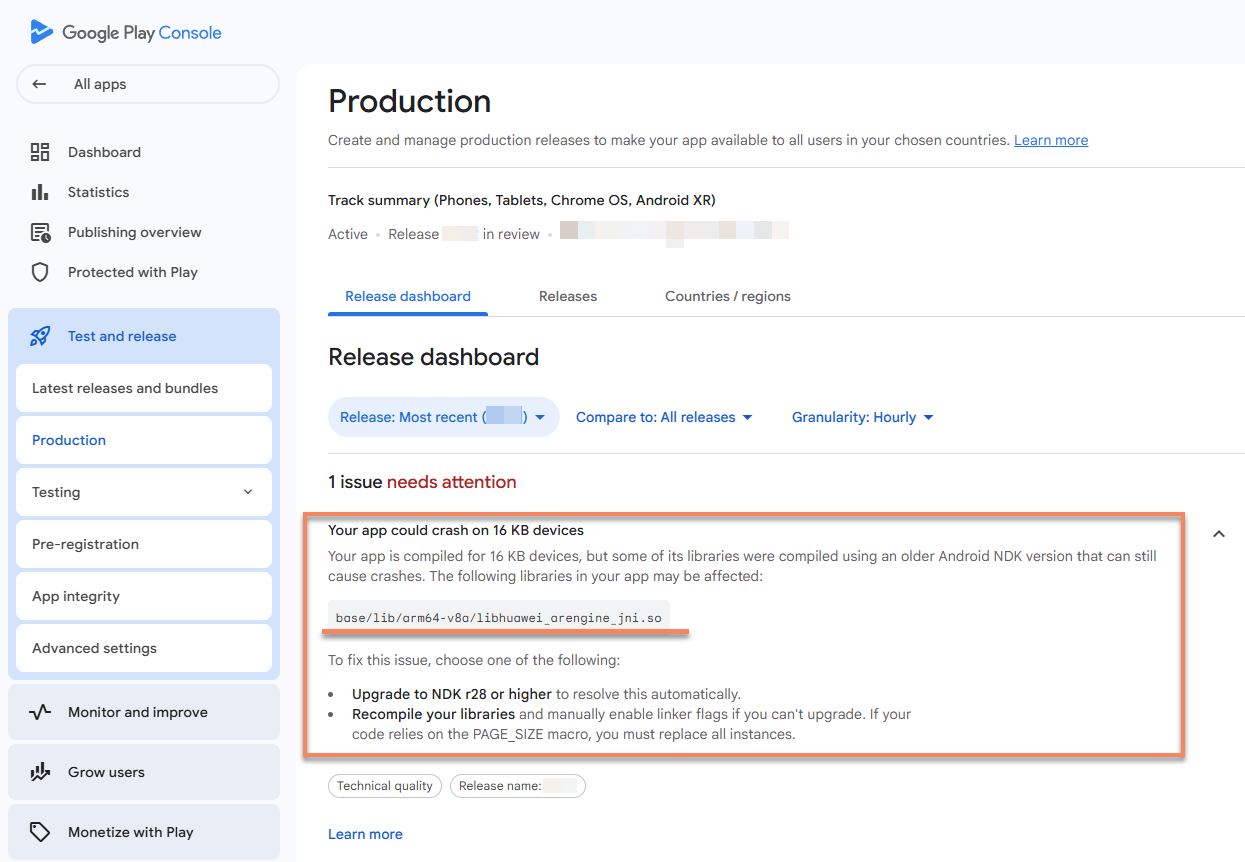
Your app could crash on 16 KB devices
base/lib/arm64-v8a/libhuawei_arengine_jni.so
Regarding the AR Engine SDK:
Version 3.7.0.3 is compiled by Huawei using an early Android NDK, which is the reason for the Google Play warning. See the description on Compiling apps with Android NDK r27 and lower in the Google documentation for details.
Version 3.7.0.3 supports loading on devices with a 16 KB Android memory page size, which is also the reason why Google Play does not prohibit app publishing.
Version 4.0.0.5 does not support loading on devices with a 16 KB Android memory page size. This is the latest publicly available version of the AR Engine SDK in the Android ecosystem, so the EasyAR Sense Unity Plugin still uses version 3.7.0.3. The EasyAR Sense Unity Plugin's use of AR Engine SDK 3.7.0.3 does not affect the app's launch on Google Play and will not actually cause a crash:
Huawei devices are not 16 KB Android devices.
EasyAR Sense uses a whitelist mechanism to avoid running the AR Engine SDK on non-Huawei devices. How to handle this warning:
If you need to use the AR Engine feature on Huawei devices, it is recommended to ignore this warning.
If you do not need to support Huawei devices or do not need to use the AR Engine feature, you can turn off the AR Engine SDK in EasyAR Configuration.
Note
On Huawei devices, even if the AR Engine is turned off, other EasyAR functions can still work normally, but the motion tracking effect will be different from that of the AR Engine, and other functions that use motion tracking will also be affected.
Additional Notes for the HarmonyOS Platform
HarmonyOS Compatible with Android
The EasyAR Sense Unity Plugin fully supports HarmonyOS 1.0 – 4.x.
Native HarmonyOS/Pure HarmonyOS/HarmonyOS NEXT
The EasyAR Sense Unity Plugin will support native HarmonyOS 5.0+ in the near future. The current version does not support native HarmonyOS/Pure HarmonyOS and can only be used through the Android app compatibility layer.
Tip
The international version of Unity does not support native HarmonyOS. You need to use Tuanjie Engine.
WebGL
The EasyAR Sense Unity Plugin does not support Unity's WebGL.
Tip
Functions developed by directly using EasyAR cloud service interfaces (such as the CRS service interface) can be published to the Web platform.
Graphics API
The EasyAR Sense Unity Plugin directly uses Unity's rendering pipeline and supports all graphics APIs that can be used in Unity.
Scriptable Render Pipeline
The EasyAR Sense Unity Plugin supports Universal Render Pipeline (URP) 7.0.0 or higher.
The EasyAR Sense Unity Plugin does not support High Definition Render Pipeline (HDRP).
Note
Statement on Support for Unity 6 URP 17+ Render Graph
EasyAR supports the Unity 6 URP 17+ render graph, but there are still some unresolved issues in Unity itself. When encountering abnormal situations, you can try to use the URP Compatibility Mode provided by Unity.
Some issues have been resolved in the latest version of Unity. It is recommended to use version 6.2 or higher.
Known issues in non-compatibility mode include:
[Unresolved] When obtaining the camera texture from EasyAR (similar to the usage in the ImageTracking_Coloring3D example and the ARSession Workflow (CameraDevice) example), visual glitches and artifacts can be observed on iOS/Mac devices. We have reproduced this problem in a pure Unity package and reported it to Unity: Glitches on iOS with AR Camera Image Rendering (URP 17 render graph). You can follow the updates of Unity Issue UUM-87787 and the release notes of future Unity versions for the progress of the problem. For all versions of Unity 6, you can use the partial mitigation measure, which is enabled by default.
For Unity 6.2 and higher, you can set the Render Scale in the Universal Render Pipeline Asset to a value outside the range of 0.96 - 1.05 to avoid this problem.
[Fixed in Unity 6.2] On Windows DX11, the camera image will make the rendering effect of objects in the scene unpredictable. In Unity versions 6.0 - 6.1, EasyAR provides an avoidance option] and it is enabled by default.
-
The current version does not support native HarmonyOS/Pure HarmonyOS 5.0.↩