4.6 버전에서 4000 버전으로의 마이그레이션 예시: SpatialMap_Sparse_Building 예시 마이그레이션
이 문서는 SpatialMap_Sparse_Building 예시를 EasyAR Sense Unity Plugin 4.6 버전에서 4000 버전으로 옮기는 방법을 설명합니다.
플러그인 패키지 교체
플러그인 패키지 교체는 일반 마이그레이션 가이드를 참고하세요.
호환되지 않는 코드 수정: 가장 빨리 실행되게 하는 방법
원래 MapBuilding_SparseSample 스크립트의 SparseSpatialMapWorkerFrameFilter를 SparseSpatialMapBuilderFrameFilter로 바꿉니다.
이전 버전 코드:
private SparseSpatialMapWorkerFrameFilter sparse;다음으로 변경:
private SparseSpatialMapBuilderFrameFilter sparse;
Awake에서 SparseSpatialMapBuilderFrameFilter를 가져오는 코드를 업데이트합니다.
이전 버전 코드:
sparse = Session.GetComponentInChildren<SparseSpatialMapWorkerFrameFilter>();다음으로 변경:
Session.StateChanged += (state) =>
{
    if (state == ARSession.SessionState.Ready)
    {
        sparse = Session.Assembly.FrameFilters.Where(f => f is SparseSpatialMapBuilderFrameFilter).FirstOrDefault() as SparseSpatialMapBuilderFrameFilter;
    }
};
Update에서 Status를 출력하는 코드를 제거하고, 새 API에 맞게 sparse spatial map 참조를 sparse.Target으로 바꿉니다.
이전 버전 코드:
private void Update()
{
    Status.text = $"Device Model: {SystemInfo.deviceModel} {deviceModel}" + Environment.NewLine +
        "Frame Source: " + ((Session.Assembly != null && Session.Assembly.FrameSource) ? Session.Assembly.FrameSource.GetType().ToString().Replace》("easyar.", "").Replace("FrameSource", "") : "-") + Environment.NewLine +
        "Tracking Status: " + Session.TrackingStatus + Environment.NewLine +
        "Sparse Point Cloud Count: " + (sparse.LocalizedMap == null ? "-" : sparse.LocalizedMap.PointCloud.Count.ToString()) + Environment.NewLine +
        "Cube Location: " + (onSparse ? "On Sparse Spatial Map" : (Session.TrackingStatus.OnSome && Session.TrackingStatus != 》MotionTrackingStatus.NotTracking ? "Air" : "-")) + Environment.NewLine +
        Environment.NewLine +
        "Gesture Instruction" + Environment.NewLine +
        "	Move to Sparse Spatial Map Point: One Finger Move" + Environment.NewLine +
        "	Scale: Two Finger Pinch";

    if (Input.touchCount == 1 && !EventSystem.current.IsPointerOverGameObject(Input.GetTouch(0).fingerId))
    {
        var touch = Input.touches[0];
        if (touch.phase == TouchPhase.Moved)
        {
            var viewPoint = new Vector2(touch.position.x / Screen.width, touch.position.y / Screen.height);
            if (sparse && sparse.LocalizedMap)
            {
                var points = sparse.LocalizedMap.HitTest(viewPoint);
                foreach (var point in points)
                {
                    onSparse = true;
                    TouchControl.transform.position = sparse.LocalizedMap.transform.TransformPoint(point);
                    break;
                }
            }
        }
    }
}
다음으로 변경:
private void Update()
{
    if (Input.touchCount == 1 && !EventSystem.current.IsPointerOverGameObject(Input.GetTouch(0).fingerId))
    {
        var touch = Input.touches[0];
        if (touch.phase == TouchPhase.Moved)
        {
            var viewPoint = new Vector2(touch.position.x / Screen.width, touch.position.y / Screen.height);
            if (sparse && sparse.Target)
            {
                var points = sparse.Target.HitTest(viewPoint);
                foreach (var point in points)
                {
                    TouchControl.transform.position = sparse.Target.transform.TransformPoint(point);
                    break;
                }
            }
        }
    }
}
이 시점이면 예시는 기본적으로 실행할 수 있습니다.
scene 다시 구성: 새 기능 사용 준비
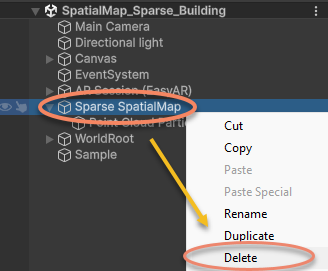
scene의 Sparse SpatialMap 노드를 삭제합니다.
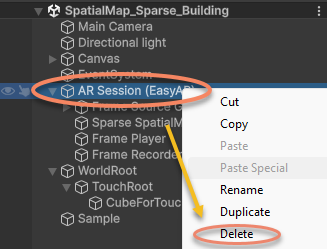
scene의 AR Session을 삭제합니다.
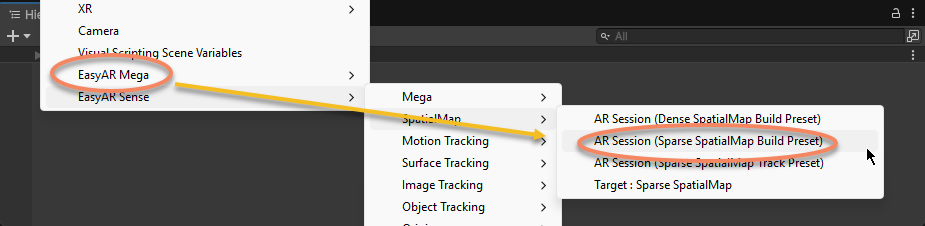
AR Session을 다시 만듭니다.
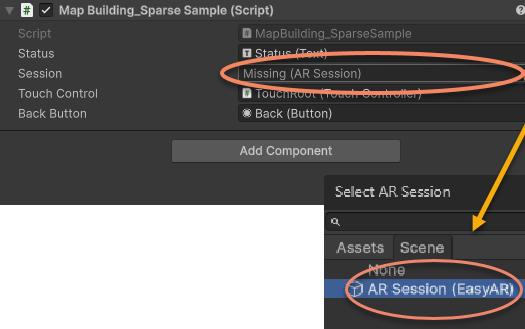
예시 스크립트의 ARSession을 새로 만든 AR Session (EasyAR)으로 다시 지정합니다.
이 시점이면 예시 scene과 스크립트가 4000.0 버전으로 업데이트되어 실행할 수 있습니다.