버전 4.6에서 버전 4000으로의 마이그레이션 예: SpatialMap_Sparse_Localizing sample 마이그레이션
이 문서는 SpatialMap_Sparse_Localizing sample을 EasyAR Sense Unity Plugin 버전 4.6에서 버전 4000으로 마이그레이션하는 방법을 설명합니다.
plugin 패키지 교체
plugin 패키지 교체는 일반 마이그레이션 가이드를 참조하십시오.
scene 다시 구성(필수)
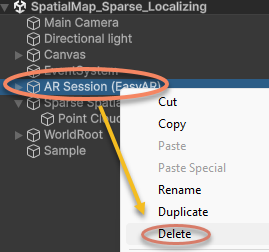
scene에서 AR Session을 삭제합니다.
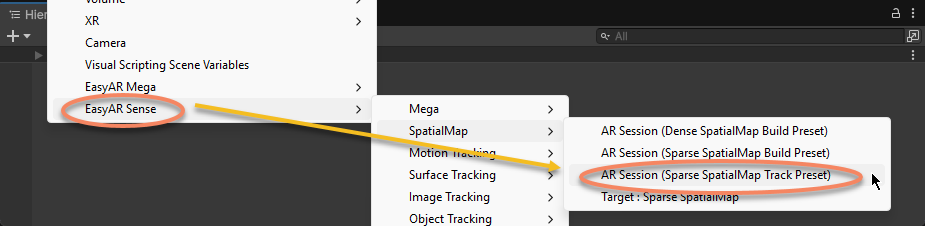
AR Session을 다시 생성합니다.
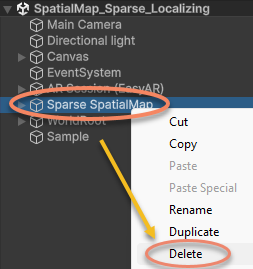
scene에서 Sparse SpatialMap을 삭제합니다.
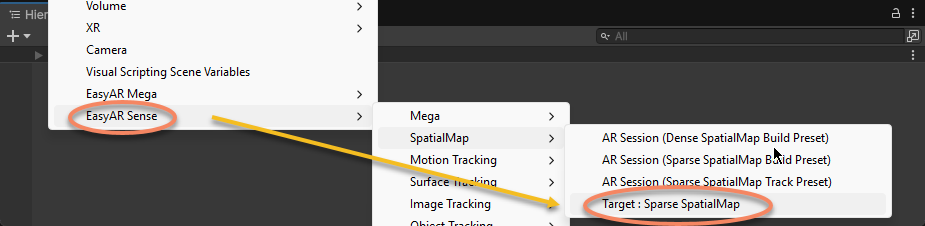
Sparse SpatialMap을 다시 생성합니다.
Sparse SpatialMap Controller 컴포넌트의 Inspector 창에서 sparse spatial map의 ID와 Name을 입력하고 Tracker를 지정합니다.
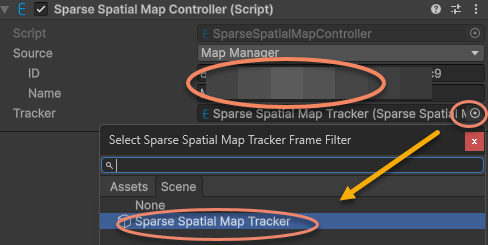
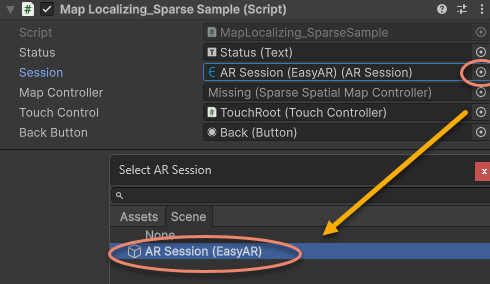
sample script의 ARSession을 새로 생성한 AR Session (EasyAR)에 다시 지정합니다.
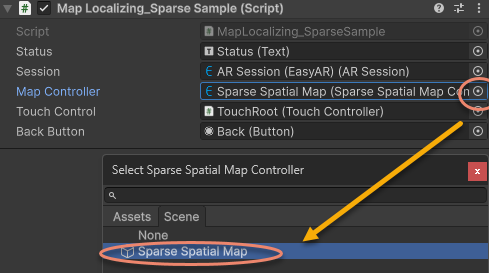
sample script의 MapController를 새로 생성한 Sparse SpatialMap Controller에 다시 지정합니다.
호환되지 않는 코드 수정
Start에서 Status를 출력하는 코드를 제거하고, 새 버전 API에 따라 sparse spatial map의 localization callback을 MapController.TargetFound 및 MapController.TargetLost로 업데이트합니다.
이전 버전 코드:
sparse = Session.GetComponentInChildren<SparseSpatialMapWorkerFrameFilter>();

if (string.IsNullOrEmpty(MapController.MapManagerSource.ID) || string.IsNullOrEmpty(MapController.MapManagerSource.Name))
{
    throw new UIPopupException("Map ID or Name NOT set, please set MapManagerSource on: " + MapController + Environment.NewLine +
        "To create SpatialMap, use <SpatialMap_SparseSpatialMap> sample." + Environment.NewLine +
        "To get Map ID and Name, use EasyAR Develop Center (www.easyar.com) -> SpatialMap -> Database Details." + Environment.NewLine +
        "Map ID is used when loading, it can be used to share maps among devices.", 100);
}

MapController.MapLoad += (map, status, error) =>
{
    GUIPopup.EnqueueMessage("Load map {name = " + map.Name + ", id = " + map.ID + "} into " + sparse.name + Environment.NewLine +
        " => " + status + (string.IsNullOrEmpty(error) ? "" : " <" + error + ">"), status ? 3 : 5);

    if (!status)
    {
        return;
    }

    GUIPopup.EnqueueMessage("Notice: load map (only the first time each map) will trigger a download in this sample." + Environment.NewLine +
        "Statistical request count will be increased (more details on EasyAR website)." + Environment.NewLine +
        "Map cache is used after a successful download." + Environment.NewLine +
        "Map cache will be cleared if SparseSpatialMapManager.clear is called or app uninstalled.", 5);
};

MapController.MapLocalized += () =>
{
    GUIPopup.EnqueueMessage("Localized map {name = " + MapController.MapInfo.Name + "}", 3);
};

MapController.MapStopLocalize += () =>
{
    GUIPopup.EnqueueMessage("Stopped localize map {name = " + MapController.MapInfo.Name + "}", 3);
};

sparse.Localizer.startLocalization();
다음으로 변경:
sparse = Session.GetComponentInChildren<SparseSpatialMapWorkerFrameFilter>();

MapController.TargetFound += () =>
{
    Debug.Log($"Found target {{name = {MapController.Info.Name}}}");
};

MapController.TargetLost += () =>
{
    if (!MapController) { return; }
    Debug.Log($"Lost target {{name = {MapController.Info.Name}}}");
};
Update에서 새 API를 사용하여 희소 공간 지도가 존재하고 직접 추적되는지 판단합니다:
원래 버전 코드:
private void Update()
{
    Status.text = $"Device Model: {SystemInfo.deviceModel} {deviceModel}" + Environment.NewLine +
        "VIO Device" + Environment.NewLine +
        "\tType: " + ((Session.Assembly != null && Session.Assembly.FrameSource) ? Session.Assembly.FrameSource.GetType().ToString().Replace("easyar.", "").Replace("FrameSource", "") : "-") + Environment.NewLine +
        "\tTracking Status: " + Session.TrackingStatus + Environment.NewLine +
        "Sparse Spatial Map" + Environment.NewLine +
        "\tWorking Mode: " + sparse.WorkingMode + Environment.NewLine +
        "\tLocalization Mode: " + sparse.LocalizerConfig.LocalizationMode + Environment.NewLine +
        "Localized Map" + Environment.NewLine +
        "\tName: " + (sparse.LocalizedMap == null ? "-" : (sparse.LocalizedMap.MapInfo == null ? "-" : sparse.LocalizedMap.MapInfo.Name)) + Environment.NewLine +
        "\tID: " + (sparse.LocalizedMap == null ? "-" : (sparse.LocalizedMap.MapInfo == null ? "-" : sparse.LocalizedMap.MapInfo.ID)) + Environment.NewLine +
        "\tPoint Cloud Count: " + (sparse.LocalizedMap == null ? "-" : sparse.LocalizedMap.PointCloud.Count.ToString()) + Environment.NewLine +
        "Cube Location: " + (onSparse ? "On Sparse Spatial Map" : (Session.TrackingStatus.OnSome && Session.TrackingStatus != MotionTrackingStatus.NotTracking ? "Air" : "-")) + Environment.NewLine +
        Environment.NewLine +
        "Gesture Instruction" + Environment.NewLine +
        "\tMove to Sparse Spatial Map Point: One Finger Move" + Environment.NewLine +
        "\tScale: Two Finger Pinch";

    if (Input.touchCount == 1 && !EventSystem.current.IsPointerOverGameObject(Input.GetTouch(0).fingerId))
    {
        var touch = Input.touches[0];
        if (touch.phase == TouchPhase.Moved)
        {
            var viewPoint = new Vector2(touch.position.x / Screen.width, touch.position.y / Screen.height);
            if (sparse && sparse.LocalizedMap)
            {
                var points = sparse.LocalizedMap.HitTest(viewPoint);
                foreach (var point in points)
                {
                    onSparse = true;
                    TouchControl.transform.position = sparse.LocalizedMap.transform.TransformPoint(point);
                    break;
                }
            }
        }
    }
}
다음으로 수정:
private void Update()
{
    if (Input.touchCount == 1 && !EventSystem.current.IsPointerOverGameObject(Input.GetTouch(0).fingerId))
    {
        var touch = Input.touches[0];
        if (touch.phase == TouchPhase.Moved)
        {
            var viewPoint = new Vector2(touch.position.x / Screen.width, touch.position.y / Screen.height);
            if (MapController && MapController.IsDirectlyTracked)
            {
                var points = MapController.HitTest(viewPoint);
                foreach (var point in points)
                {
                    onSparse = true;
                    TouchControl.transform.position = MapController.transform.TransformPoint(point);
                    break;
                }
            }
        }
    }
}
이제 sample scene과 scripts가 버전 4000.0으로 업데이트되어 실행할 수 있습니다.